Before You Convert a Markdown (.md) File to PDF
Do you convert every .md (Markdown) file you receive into a PDF?
I get the appeal. PDF is a format everyone knows, it feels safe, and it’s easy to share with colleagues and clients alike.
But converting .md files to PDF comes with a few risks that are easy to overlook — especially at work, and especially when the files come from an AI like ChatGPT or Claude.
If you’ve noticed .md files turning up more and more often lately, read on.
Caution 1: What online converters do with your file
Search for “markdown to pdf” and you’ll find plenty of online converters.
Tools like PDF Candy and CloudConvert let you pick a file in your browser and get back a clean, readable PDF in place of all those symbols. They’re genuinely handy.
What’s easy to forget is that some of these tools send your file to their own server to do the conversion.
When the conversion runs on the server side, your file is uploaded first, converted there, and the PDF is sent back to you.
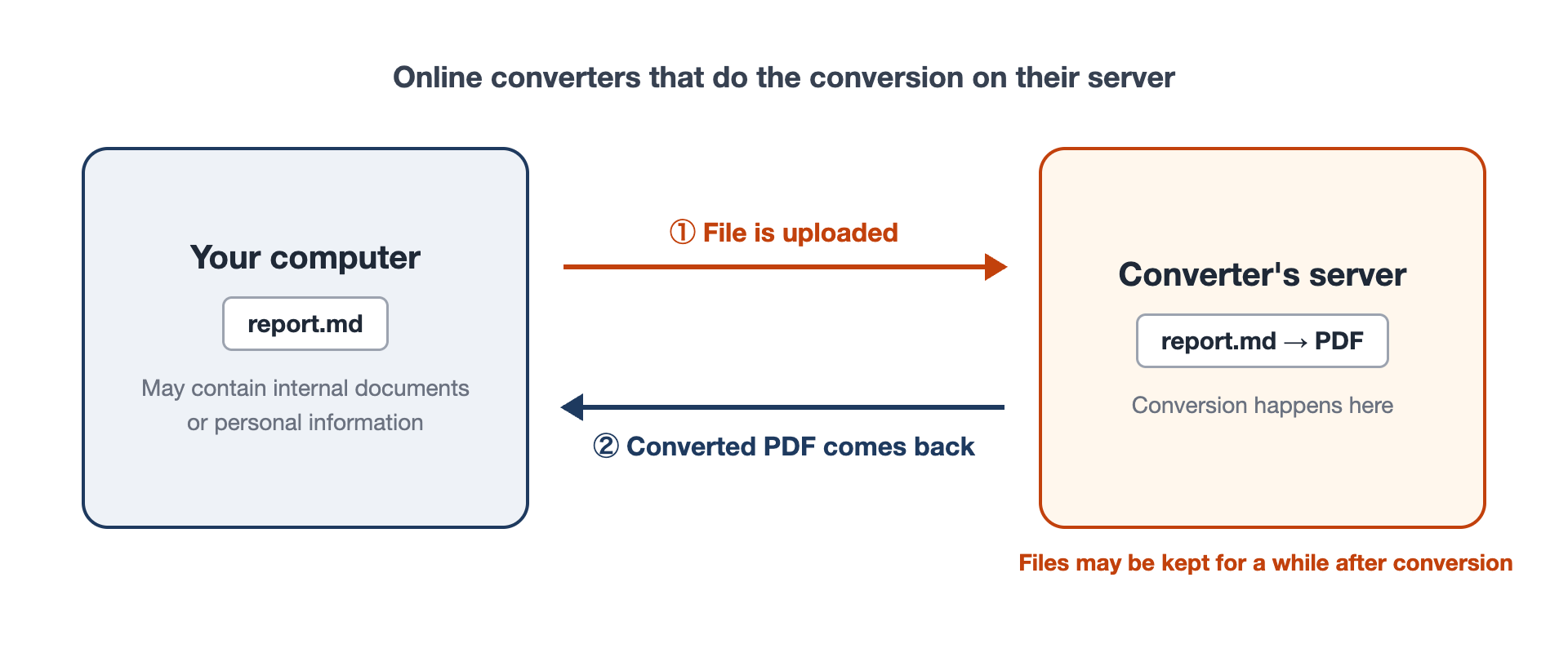
In other words, your file leaves your computer, at least for a while.
PDF Candy, for example, states in its privacy policy that uploaded files are kept on its servers for up to 2 hours, and CloudConvert says up to 24 hours. Both delete files after that, and both are open about how they handle them. Still, for that window, your file is sitting on someone else’s server.
So before converting anything that contains internal documents or personal information, read the provider’s retention and handling policy, and check whether your company allows uploading files to outside services at all.
Some tools convert entirely inside your browser
Does that mean every browser-based tool is risky? Not quite.
Browser-based tools actually come in two kinds.
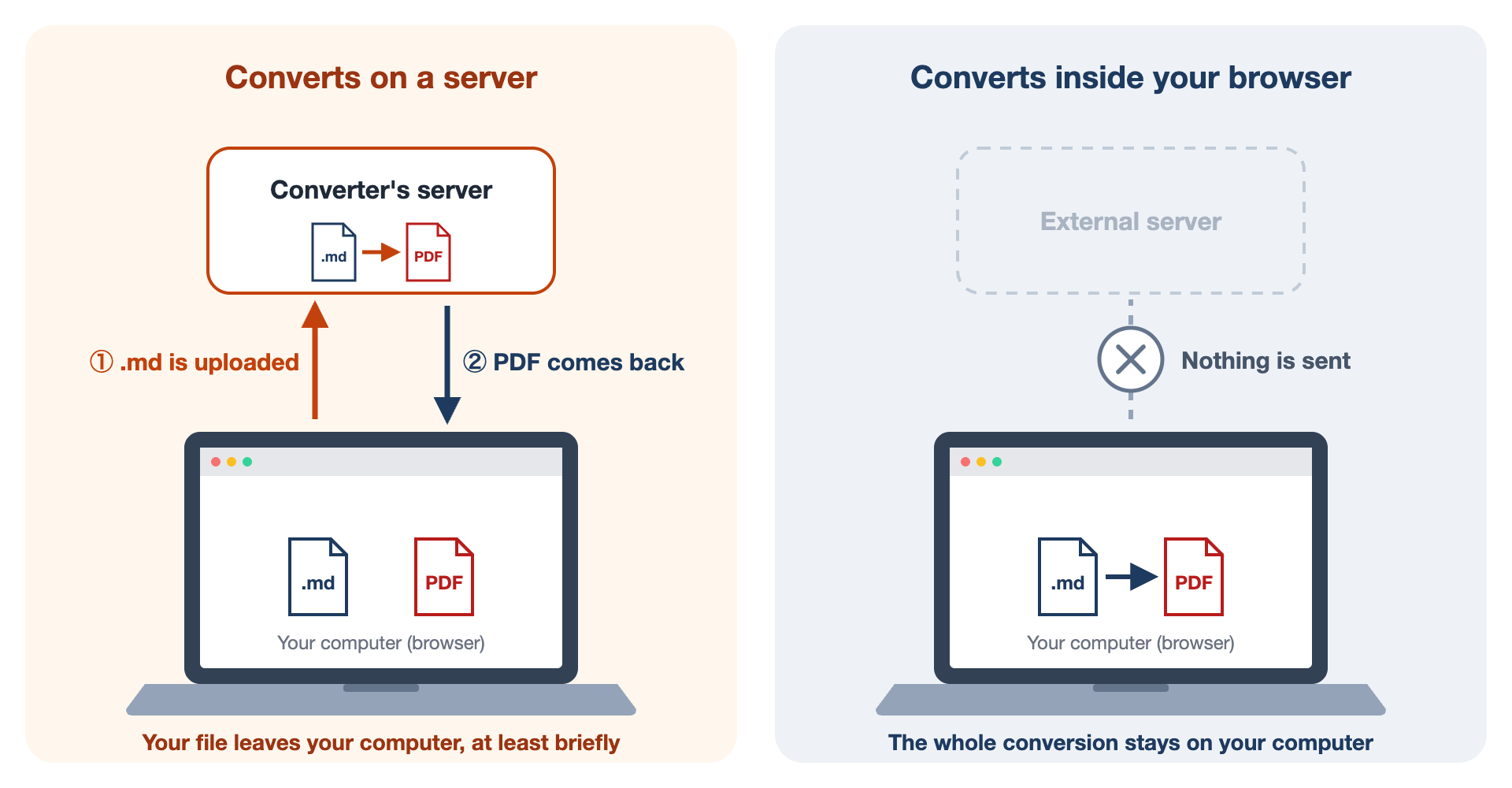
One is the kind we just looked at, which uploads your file to a server. The other reads and converts the file entirely inside your browser and sends nothing to a server. From the outside, you often can’t tell which is which.
How to tell: does it still work offline?
There’s a simple test. Open the tool, let the page finish loading, then turn off Wi-Fi (or unplug the cable) and try converting a file.
- A tool that uploads your file can’t reach its server, so the conversion fails
- A tool that works inside your browser converts just fine without a connection
If it still works offline, that at least tells you it doesn’t need to send your file anywhere to do its job.
Caution 2: Layout and special characters can break
Next, I took a sample .md (Markdown) file and ran it through one of the converters I found in search results.
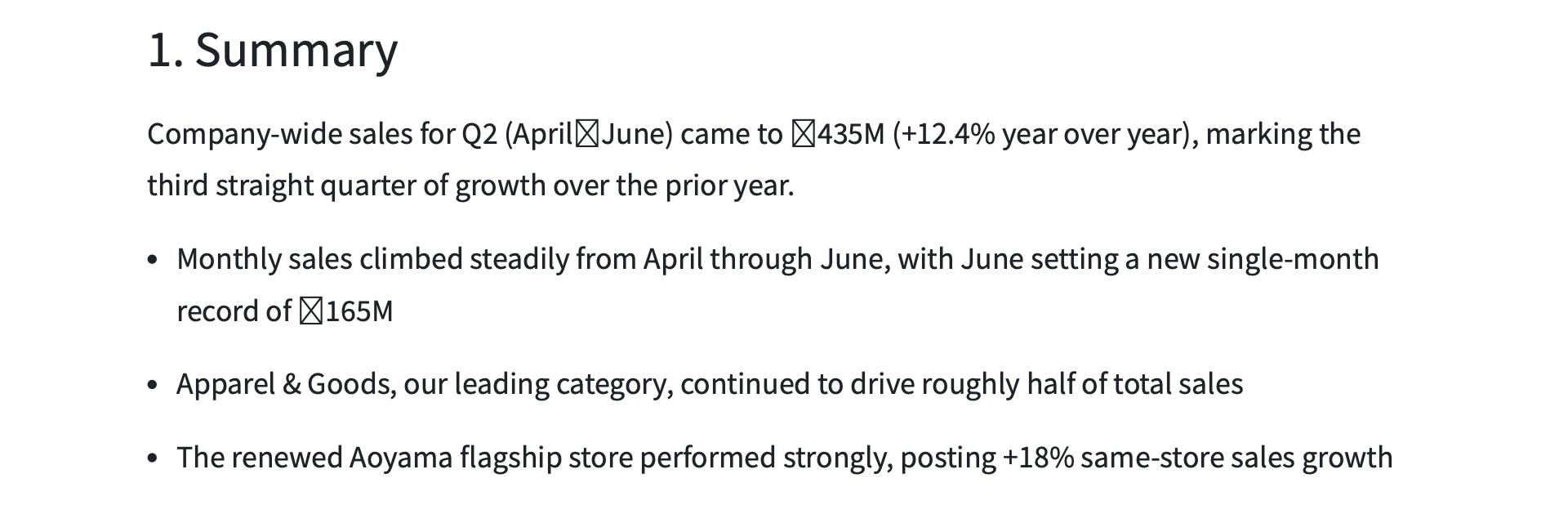
Look closely: the en dash in “April–June” and the ”¥” signs have turned into empty boxes.
Depending on the content, a converter may not be able to render some characters correctly. It happens when the font the tool uses doesn’t include a particular character — dashes, currency signs, accented letters, and emoji are common casualties. It happened with the converter I used, and it can happen with others too.
If your file contains anything beyond letters and numbers, check the PDF carefully before you send it.
You won’t know where the pages break until you convert
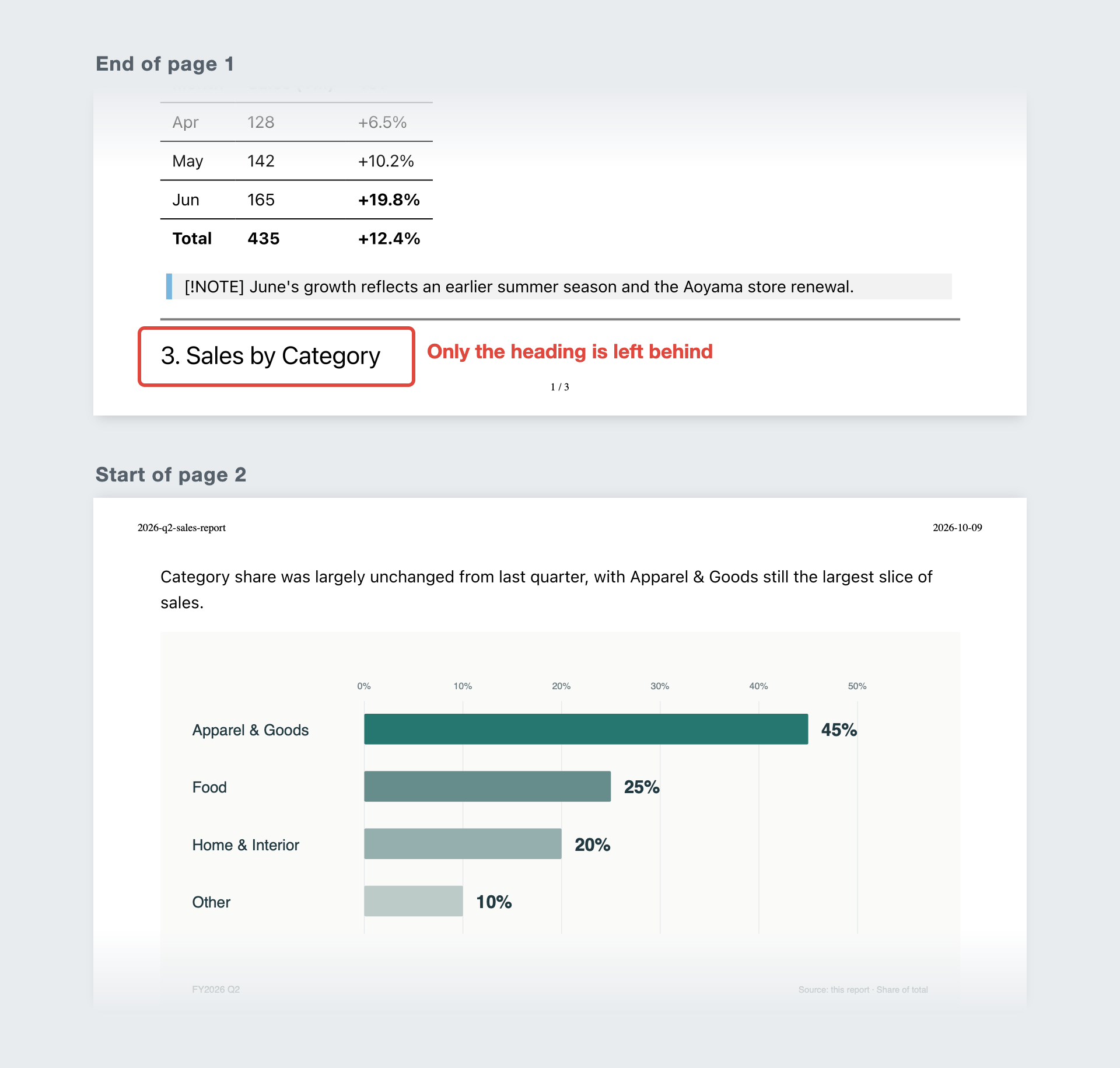
One-click conversion is convenient, but it also means you can’t fine-tune anything. Page breaks are the classic example: a bulleted list splits across two pages, or a section heading is left stranded at the bottom of a page with its content on the next. Where the pages break is up to the converter, and you won’t know until you see the result.
Caution 3: Images go missing
.md (Markdown) files can include images.
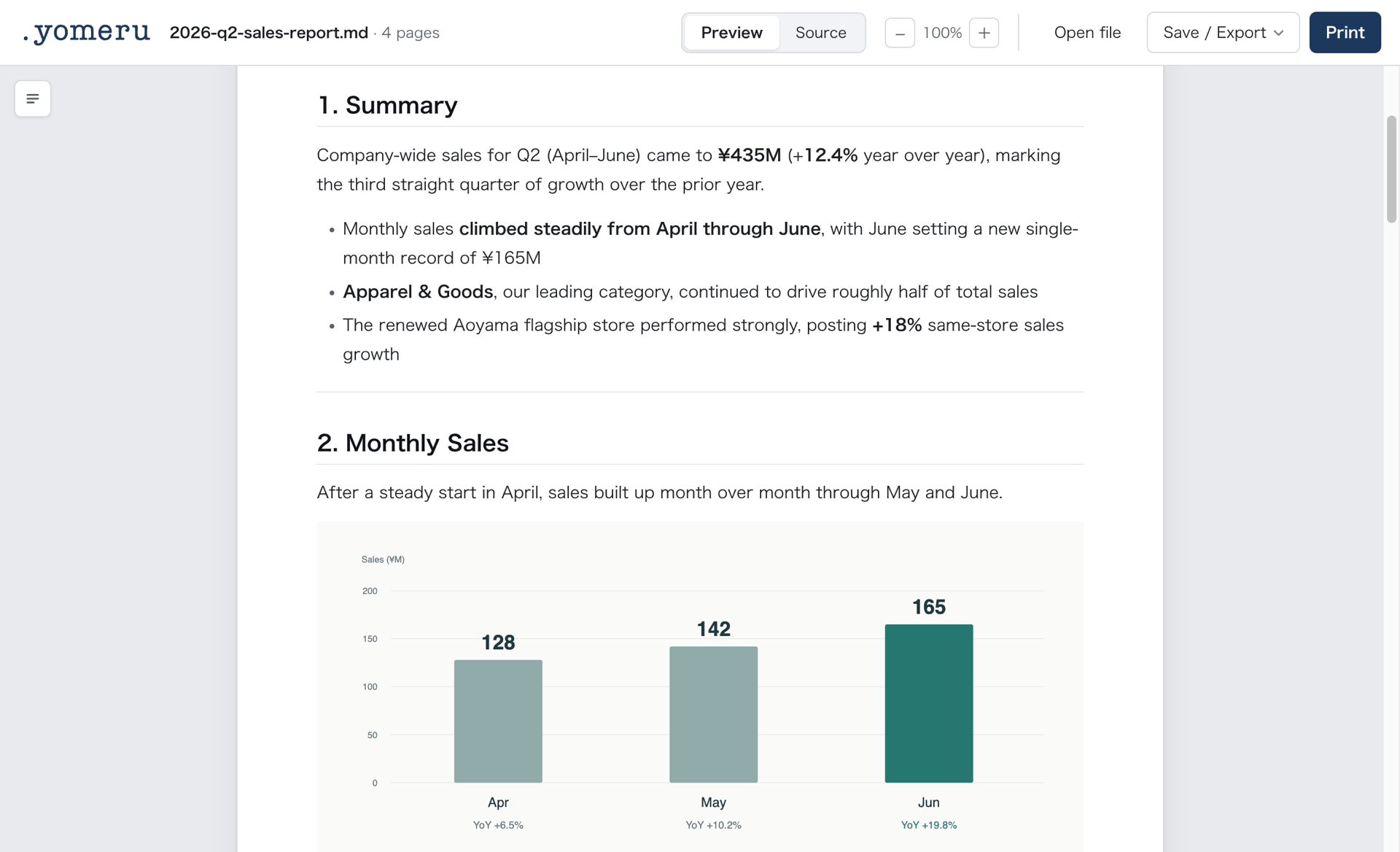
Charts and diagrams can go right into the document, making it look as polished as a Word file.
But run it through an online converter, and more often than not, the images vanish.
That’s because an .md file doesn’t actually contain the images. In the source, an image is just a line like
— a note saying “show the image stored at this location.” The image itself lives in a separate file.
So if you hand a converter only the .md file, it has no way to see the image files, and they simply drop out of the PDF.
Whenever you convert, open the PDF and check that the images actually made it in.
Caution 4: AI and PDF don’t get along
This one is for anyone working with ChatGPT, Claude, or other AI tools through .md (Markdown) files.
As AI becomes part of everyday work, more people keep meeting notes, work logs, even personal journals as .md files.
If you’re wondering why anyone would bother, the reason is to give the AI an accurate memory.
AI apps do remember past conversations, but as conversations pile up, older details get fuzzy and sometimes disappear altogether.
Keeping that memory as documents, organized and stored, lets the AI go back through events in order and quote them precisely later.
Then why not keep them as PDFs instead?
Here’s something few people realize: PDFs are expensive for AI to handle.
When AI reads a file
Why do AI tools keep handing you .md files? Because .md is one of the lightest structured text formats there is.
That may sound technical, but it simply means it’s the format AI finds easiest to read and write.
I measured how many “tokens” Claude uses to read the same content as .md and as PDF.
A one-line note in an .md file (about 85 characters) costs about 36 tokens to read.
The same line as a PDF costs about 1,600 tokens — roughly 45 times as much.
That’s because when AI reads a PDF, it doesn’t just read the text: it also reads every page as an image (per Claude’s official documentation). In exchange for understanding how the page looks, every page adds roughly 1,600 tokens.
| Document | As .md | As PDF |
|---|---|---|
| A one-line note | about 36 tokens | about 1,600 tokens (about 45×) |
| A full page of text (about 400 words) | about 740 tokens | about 2,300 tokens (about 3×) |
| A 9-page document | about 6,000 tokens | about 20,000 tokens (about 3×) |
For a PDF that’s mostly visual — design mockups or drawings — reading it as images makes sense. For a text document, it’s mostly wasted tokens.
When AI writes a file
What about the other direction? You can ask AI to create a PDF directly, which seems more efficient than converting it yourself.
But AI doesn’t “write” a PDF the way it writes text. It writes a program that generates the PDF, runs it, and checks the result. That’s why, just like reading, creating a PDF uses roughly 20–80 times as many tokens as writing the same content as .md.
I had Claude write the same short set of meeting notes both ways, three times each. Compared with writing it as .md, creating the PDF took about 4 times as many tokens of output, and about 20–80 times as many tokens for the whole exchange, reading included. (The test document was in Japanese, so the exact numbers will differ for English, but the pattern is the same.)
With PDF, the AI reads back the program’s output as it works, so the amount it reads balloons. The results also varied a lot from run to run.
And what if you want to change part of it later?
An .md file is just text, so the AI can rewrite only the part you want changed, just as it does in a chat.
A PDF, on the other hand, is built to fix a layout for distribution, not to be edited (it’s not easy for people to edit either). Changing it usually means regenerating it from the source text. And if you hand the AI the PDF itself to revise, every round trip makes it read about 1,600 extra tokens per page. That takes time, too.
ChatGPT and Claude both have usage limits, and some plans bill by the token. Generating PDFs or feeding them in again and again means paying for tokens you didn’t need to spend.
For work logs, reports, and the like, keeping them as .md files — light and easy to revise — is the better choice.
yomeru solves all of this
yomeru, an .md (Markdown) viewer that runs in your browser, takes care of every one of these problems.
- Shows
.mdfiles as clean, PDF-like pages, with no conversion needed - Never sends your file anywhere (it’s a browser app, but it works without a network connection)
- Exports to PDF, offline, right from the page
- Displays, prints, and exports pages with images included
- Uses no AI for PDF export, so no tokens wasted
- Lets you adjust page breaks yourself
- Uses the fonts on your computer, so accented letters, emoji, and non-Latin scripts print just as they appear on screen
Wrapping up
If you’ve been thinking “the only way to make an .md file readable is to turn it into a PDF,” that’s not the case. A dedicated viewer can display a symbol-filled .md file as a readable document, while it stays an .md file.
My recommendation is to keep your .md files as they are.
Then, when you need to share one or archive it in a form anyone can open, convert it to PDF at that point. That, I think, is the right way for Markdown and PDF to work together.
PDF (Portable Document Format) was designed for distributing, printing, and archiving documents, and it’s a staple of business for good reason.
Precisely because it’s a format we use every day without thinking, I hope you’ll keep these cautions in the back of your mind.
Turn .md into PDF, safely and for free
Export your Markdown to PDF right in your browser, without sending the file anywhere.
Try yomeru