I Tried Using Google Drive as an Obsidian Vault
In October 2026, Google Drive and Google Docs started opening .md (Markdown) files as they are.
When that news came out, a lot of people probably thought, “Maybe I can use Google Drive as my Obsidian vault!”
So I put an Obsidian vault in Google Drive and tried it out.
The short answer: you can put a vault in Google Drive and read your notes, but making changes to them runs into walls.
I tested in detail what works and what doesn’t when you open .md files in Google Drive in my previous post. It’s worth reading alongside this one.
Note that Obsidian’s official help says syncing a vault with Google Drive is “not officially supported” (official help). If you try it, do so at your own discretion.
As of October 17, 2026. Updated October 28 with results from testing on phones (iPhone and Android).
What I wanted to do
When you take notes in Obsidian, these situations come up a lot:
- You want to read or add to your notes from your phone while you’re out
- You want someone who doesn’t use Obsidian to read a note. Ideally, they could fix things directly or leave comments
If the vault lived in Google Drive, maybe both would just work. That was the hope.
A quick refresher on Obsidian and vaults
Obsidian is a note app built on .md files
Obsidian is an app for writing notes as .md (Markdown) files and linking them together. One note is one .md file. You keep personal records or team knowledge as notes and connect them, building up a “second brain” — a personal knowledge base.
It’s often compared with popular note apps like Evernote and Notion.
A vault is a folder on your computer
The folder that holds your notes is called a “vault.” Unlike cloud-based note apps such as Evernote and Notion, a vault can only live on your computer or phone (locally).
So if you wanted to use the folder from another device or share it with others, you had to find some way to connect the vault to the cloud.
Sharing used to assume the other person also uses Obsidian
Obsidian has an official paid sync service called “Obsidian Sync,” and it can share a vault with other people. But everyone you share with also needs their own Obsidian Sync subscription (official help).
It’s end-to-end encrypted and fast, so it’s very comfortable to use. But needing everyone you share with to subscribe too is a bit of a hurdle, unless you work with .md files every day as a writer, web engineer or other specialist.
That’s why a way to use Google Drive, which so many people already use for work and personal life, has been so long-awaited.
Putting the vault in Google Drive
With this update, .md files in Google Drive now open directly in the browser. Someone who doesn’t use Obsidian should be able to read a note just by opening a shared link.
First, to put a vault in Google Drive, use “Google Drive for desktop.” It’s an app that makes your Google Drive show up as a folder on your computer.
- Install Google Drive for desktop and sign in
- Create a folder in Google Drive to use as the vault (for example,
My Drive/Obsidian) - In Obsidian, choose “Open folder as vault” and select that folder
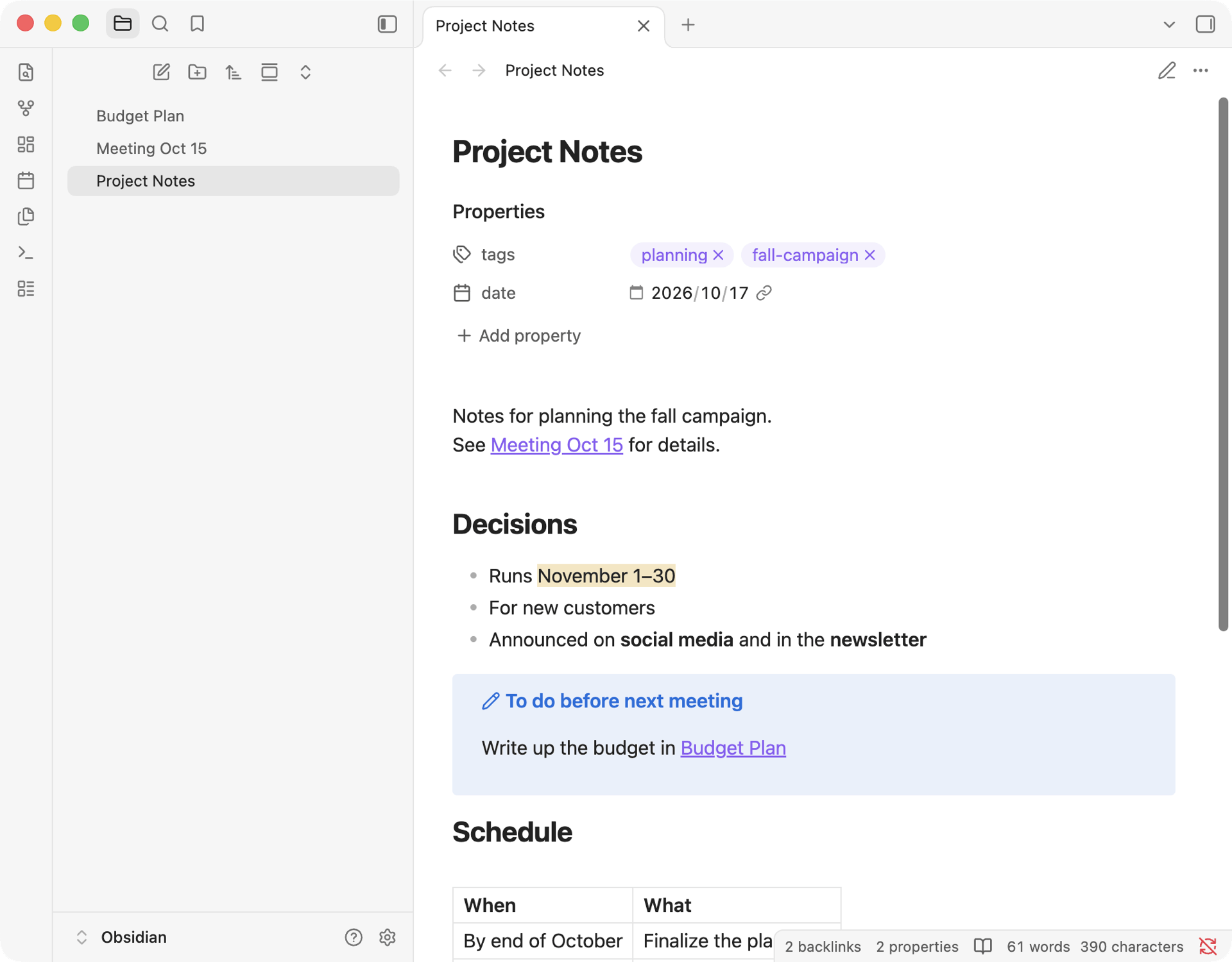
Now the notes you write in Obsidian are saved to Google Drive, and you can see them in Google Drive in your browser too.
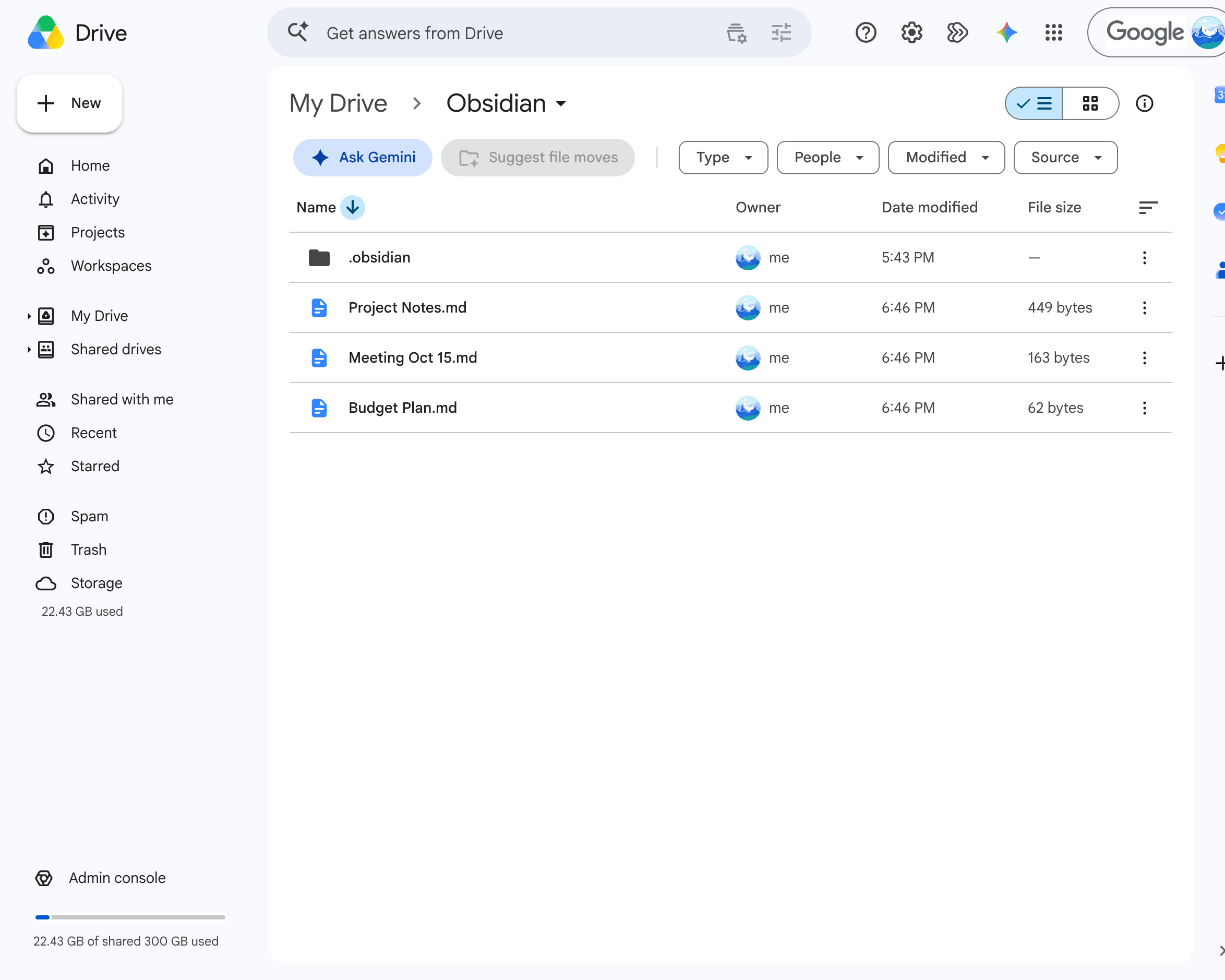
In Google Drive in the browser, you’ll also see a folder called “.obsidian” next to your notes. It holds Obsidian’s settings. It’s hidden on your computer, but Google Drive shows it. If you share the whole vault folder, the other person will see it too.
Sharing with people who don’t use Obsidian
They can read your notes
If you share the vault folder or a single note, the other person can open it from Google Drive in their browser (it actually opens in Google Docs). Headings, bullet lists, bold text, tables, and other basic formatting display nicely (previous post).
However, Obsidian-specific syntax shows up as raw symbols.
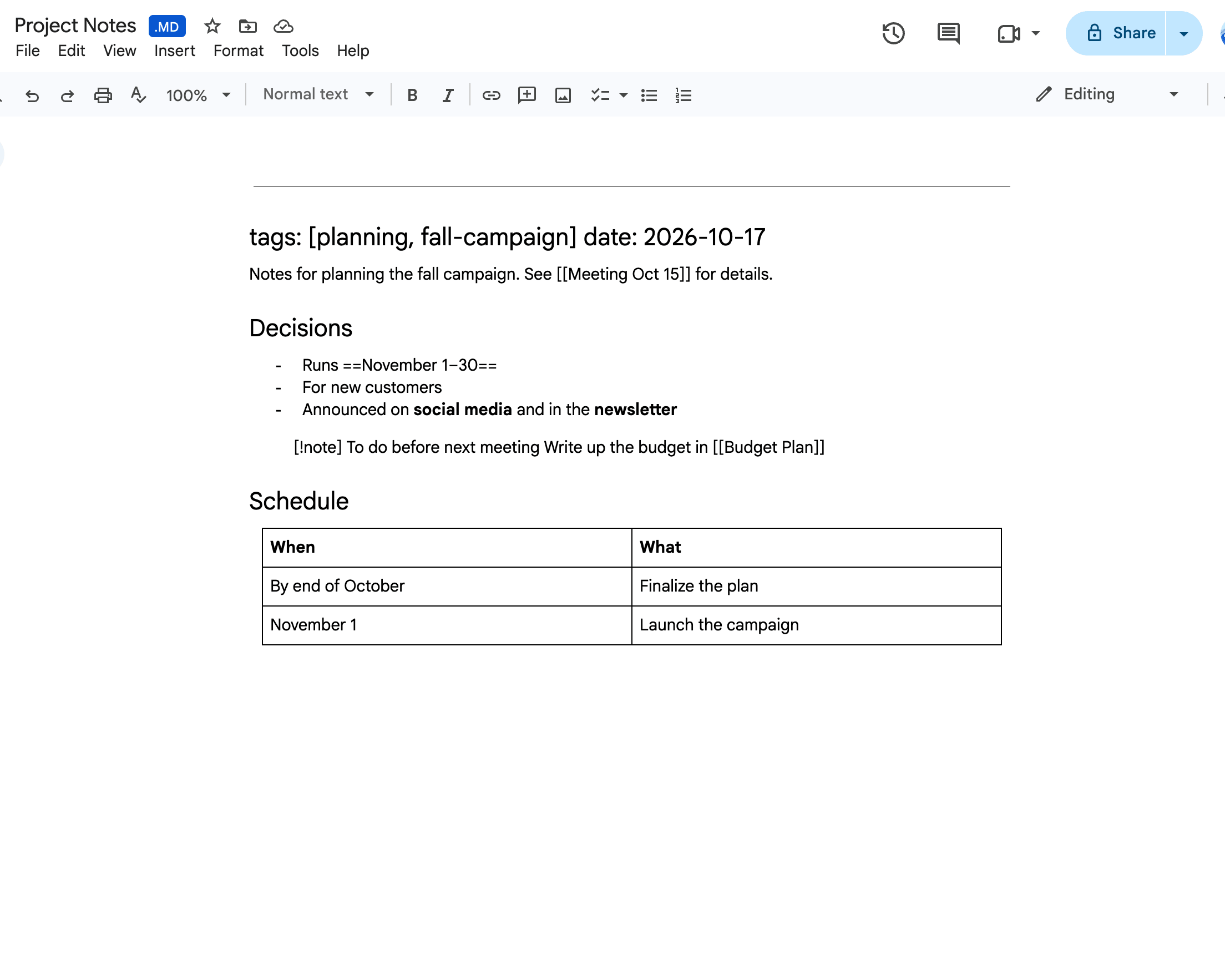
- Note links like
[[Note name]]stay as bracketed text. Clicking them goes nowhere - Highlights like
==important==keep their== - Callouts like
[!note]turn into a plain paragraph with the text as is - Tags and dates at the top of the file (frontmatter) are shown as a heading
The meaning still comes through, so if you just want to hand a note to someone without Obsidian and say “have a quick read,” this is enough. Opening and reading a note doesn’t change the file.
Change even one character, and your Obsidian syntax breaks
The trouble starts when the other person edits the note in Google Docs.
When you edit in Google Docs, the entire .md (Markdown) file is rewritten in Google Docs’ own style (I covered this in detail in my previous post). Syntax you use all the time in Obsidian ends up like this:
| Obsidian syntax | After saving in Google Docs |
|---|---|
Note link [[Note name]] | Becomes \[\[Note name\]\] and no longer works as a link |
Highlight ==important== | Becomes \==important== and is no longer highlighted |
Callout > [!note] | Becomes \[\!note\] and is no longer a callout |
| Settings at the top of the file (frontmatter: tags, dates) | Turns into a heading and is no longer read as tags or dates |
| Lines separated only by a line break | Merged into one line |
In my test, adding a single ”.” to the end of a bullet point was enough to rewrite the whole file this way. Back in Obsidian, the links were broken, the tags and date had become a heading, and the callout was gone.
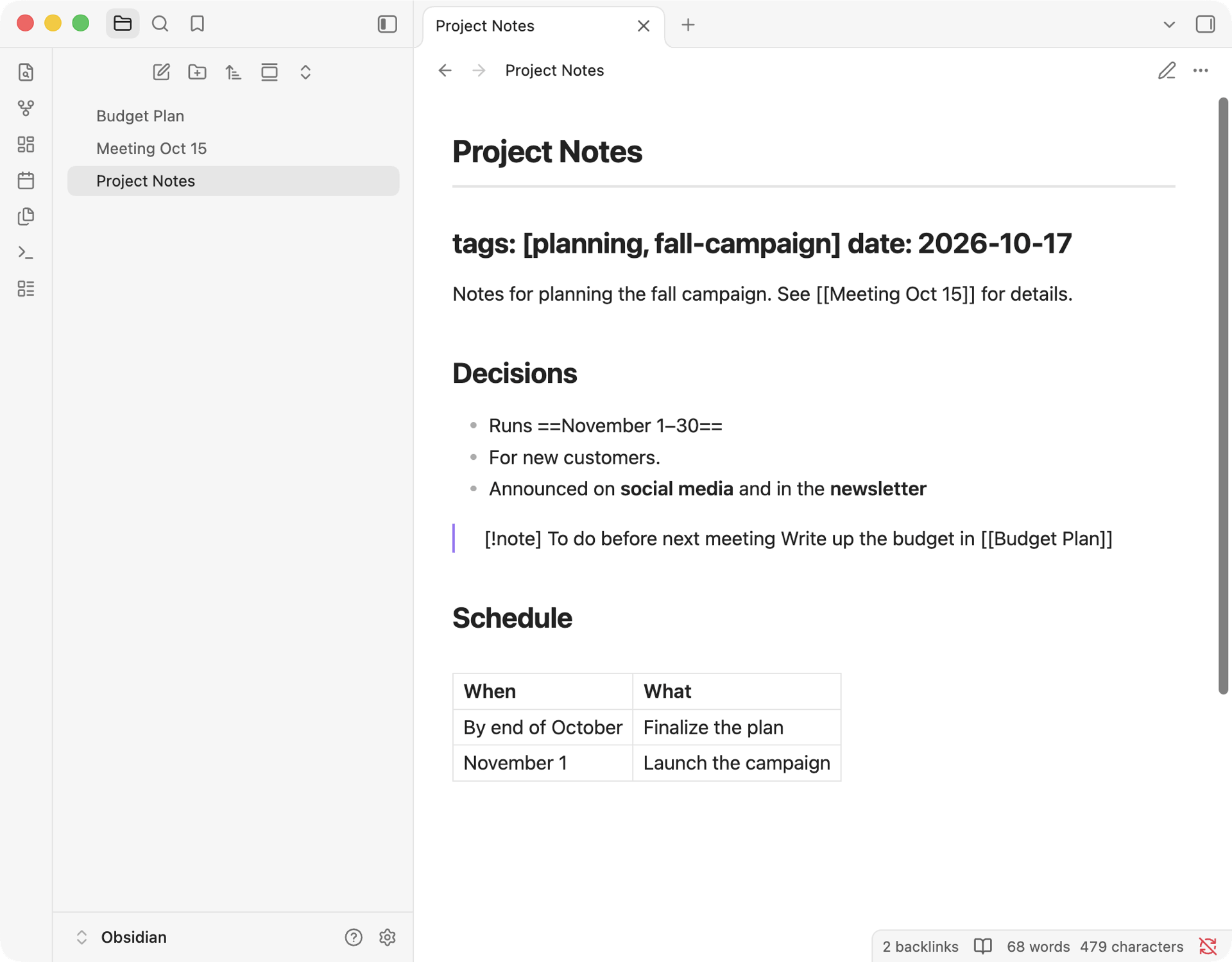
Google Docs does show a notice that some formatting isn’t supported in Markdown, and you can roll back from the version history. But if the other person doesn’t notice and just keeps editing, the file gets rewritten.
Even adding a comment breaks it
You might think, “Fine, I’ll skip edits and just ask for comments.” But comments broke the file in the same way.
The whole file is rewritten as soon as the comment box opens. Canceling without posting doesn’t undo it.
On top of that, when you post a comment, the comment itself is written into the end of the .md file: the commenter’s name, the time, the comment text, and a long string of characters Google Docs uses internally.
Open that file in Obsidian, and you get this:
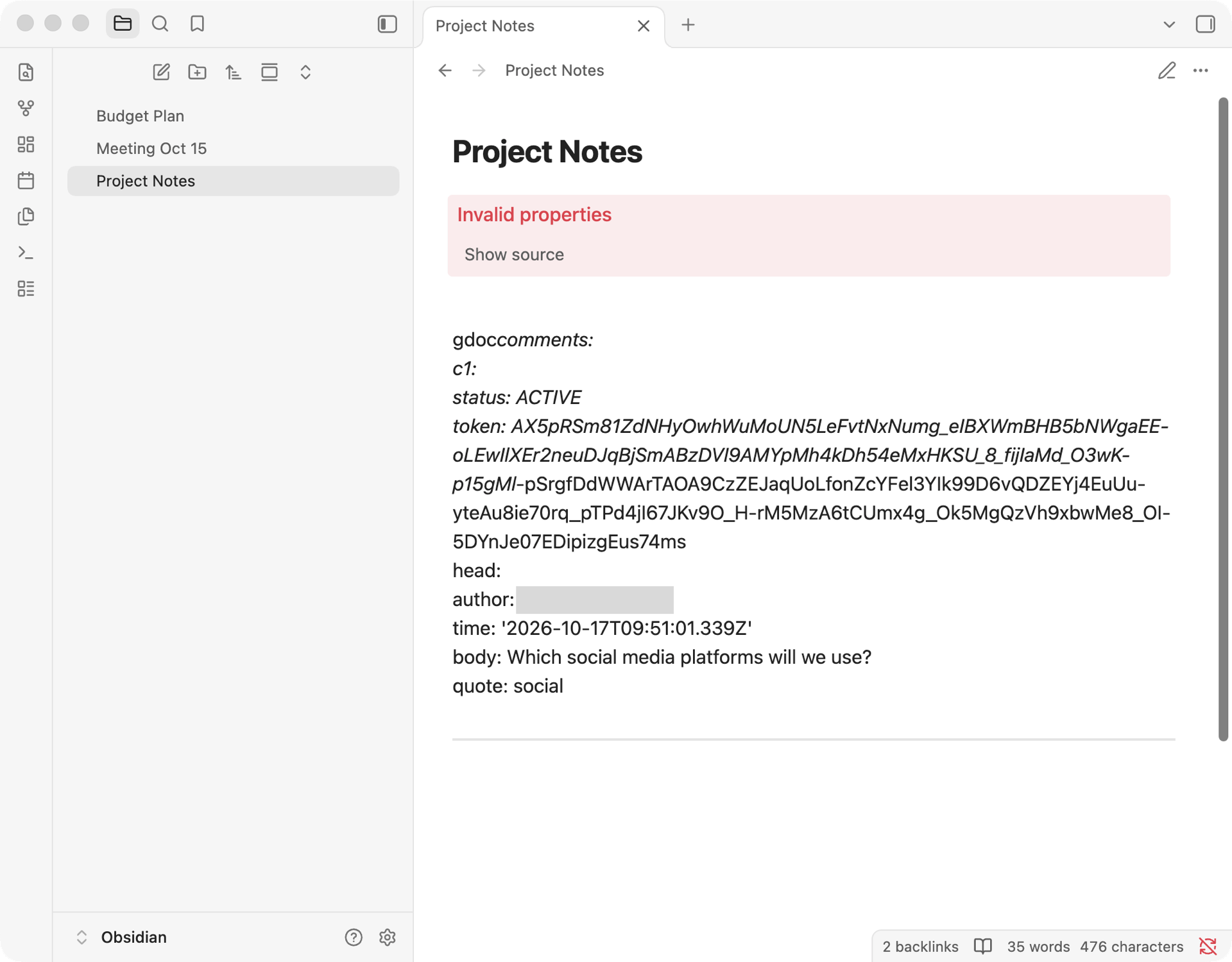
Obsidian mistakes the comment data at the end of the file for the note’s settings and shows “Invalid properties.” The actual note gets pushed down the page, so at a glance it looks like it’s gone.
If you share, make them a “Viewer”
Putting it all together, sharing with “Viewer” access and asking people to send their feedback another way (email or chat) is the safest option for now.
If you share with “Commenter” or “Editor” access, a casual comment or edit is enough to break your Obsidian note.
Reading and writing from your phone
The Google Drive mobile app doesn’t support .md yet
I also tested my other hope: reading and writing from my phone.
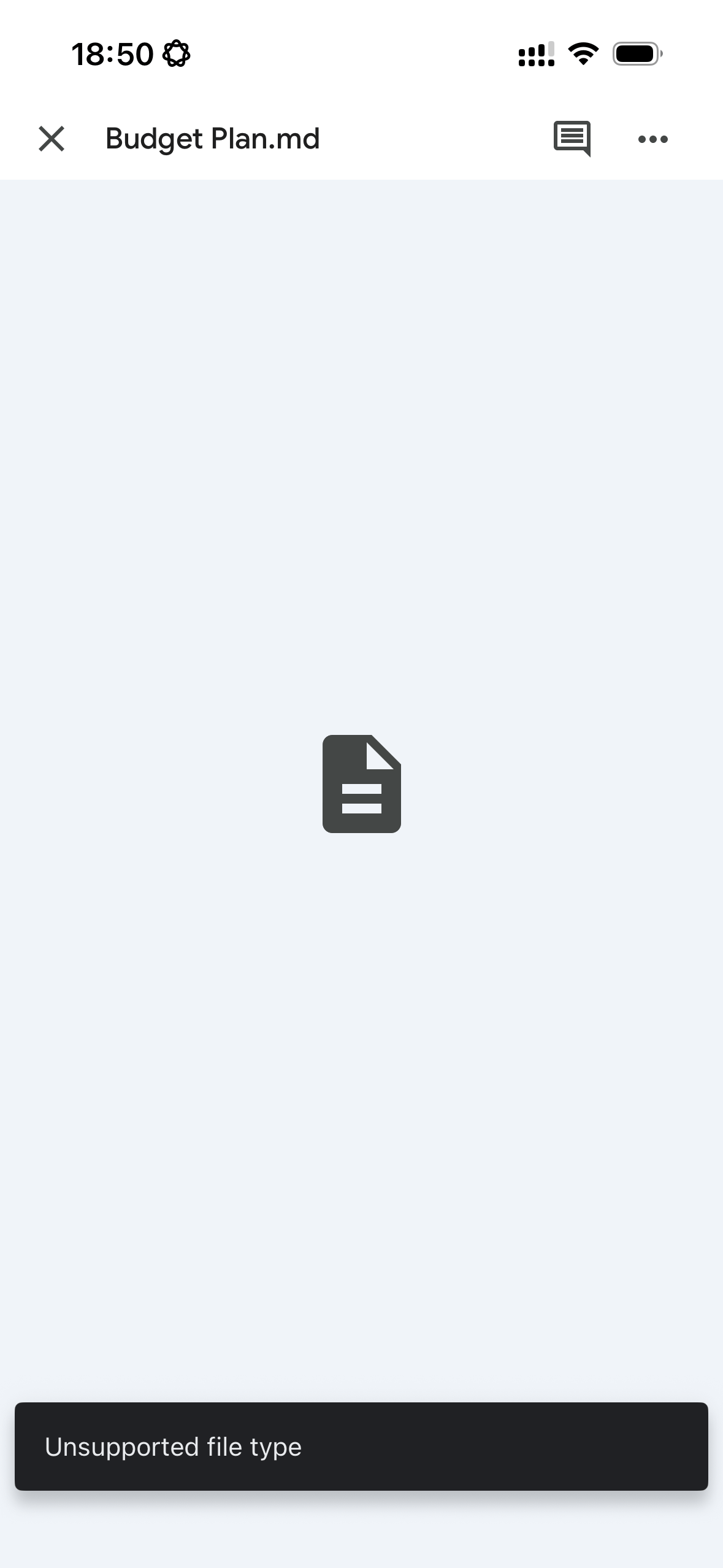
When I opened a .md (Markdown) file in the Google Drive app on iPhone, it said “Unsupported file type” and wouldn’t show the contents. There’s no option to open it in Google Docs either.
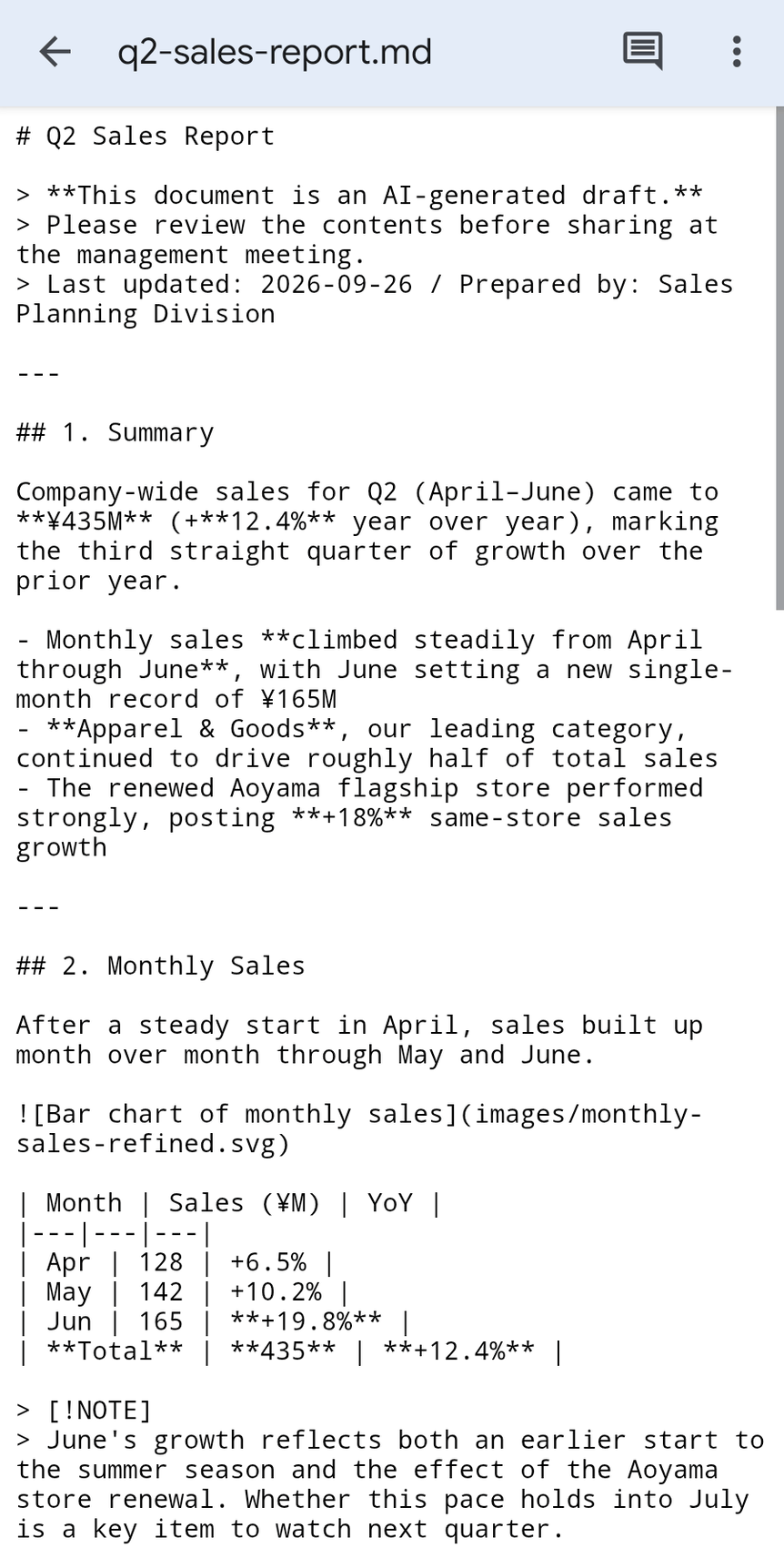
The Google Drive app on Android did open it, but only as raw text full of symbols, so the mobile app doesn’t seem to support .md yet. You can’t edit it there either.
I tested this in more detail in How to Open .md (Markdown) Files on Your Phone.
Obsidian on your phone basically can’t reach Google Drive
If the Obsidian mobile app could open Google Drive, your notes would look right, and editing them wouldn’t break anything. I tried it, but on a phone, Obsidian can basically only use Obsidian Sync (mentioned above) or local files on the phone, so you can’t see a vault in Google Drive.
On Android, though, there seems to be a way to use a sync app to copy your Google Drive vault into a local folder on the device. It’s not an official method, so I don’t recommend it, but if you’re curious, it might be worth a try.
Here’s a guide: How to Sync an Obsidian Vault With Google Drive
Even if support arrives, edits will likely break things
Even if the Google Drive mobile app supports .md someday, editing will presumably happen in Google Docs. If so, your Obsidian syntax will probably break just like it does when you edit in Google Docs on a computer.
If you want to read and write a vault in Google Drive from your phone, you need a way to open it that doesn’t break the syntax.
That’s where yomeru comes in
With yomeru, you can open files from your Google Drive vault and edit them without breaking the syntax.
It’s free, so you don’t need Obsidian Sync either. Set a Google Drive folder as your vault on your computer → open yomeru in your phone’s browser → open the file from Google Drive. That’s all. It works on both iPhone and Android *.
* To open Google Drive files on iPhone, use Chrome
Summary
| What I wanted | Result |
|---|---|
| Put a vault in Google Drive | Works. With a folder synced by Google Drive for desktop |
| Have people “read” notes from a shared link | Works. But Obsidian-specific syntax shows up as raw symbols |
| Have people “edit” notes from a shared link | Not recommended. Changing a single character breaks your Obsidian syntax |
| Get “comments” from a shared link | Not recommended. Comments break the file too, and the comment text is written into the .md |
| Read on your phone with the app | Not on iPhone / Hard to read on Android (raw text). No preview support yet |
| Write on your phone with the app | Not possible. Even once supported, edits will likely break things |
Now that Google Drive displays .md files, people who don’t use Obsidian can “read” your notes from a shared link, and that’s a big change. But when it comes to editing, or reading and writing on your phone, Google Drive alone doesn’t seem to be enough.
For now, the best approach seems to be: write in Obsidian, and use Google Drive as a window for reading.
That said, as I mentioned, yomeru can preview the files in a vault you keep in Google Drive, and edit and save them without breaking Obsidian’s structure. It works from the browser on your phone too, so if this has been bugging you, give it a try.
That’s all for this time.
A simple .md viewer
Open Markdown in a readable layout, then print or export to PDF.
Try yomeru